
More independent hoteliers are ditching manual processes and migrating to modern property management systems (PMS). Spreadsheets were never built for the demands of running a hotel today.
From reservation management to guest communication, the demands on hotel staff have grown significantly. A hotel PMS centralises all these functions into one reliable platform.
This guide covers everything you need to migrate from spreadsheets to hotel PMS. Follow these steps, and the transition is smoother than you think.
Why Hoteliers Need To Migrate From Spreadsheets To Hotel PMS
Spreadsheets cannot sync with Online Travel Agencies (OTAs), process payments, or update room inventory in real time. Every manual step your team takes is another chance for something to go wrong.
Overbookings, lost guest data, and missed revenue are what happen when you rely on outdated manual systems. These are not small issues; they are real costs to your business.
A hotel PMS automates your core operations and gives you accurate data at all times. This is the reason why smart hotels migrate from spreadsheets.
How To Migrate From Spreadsheets To Hotel PMS
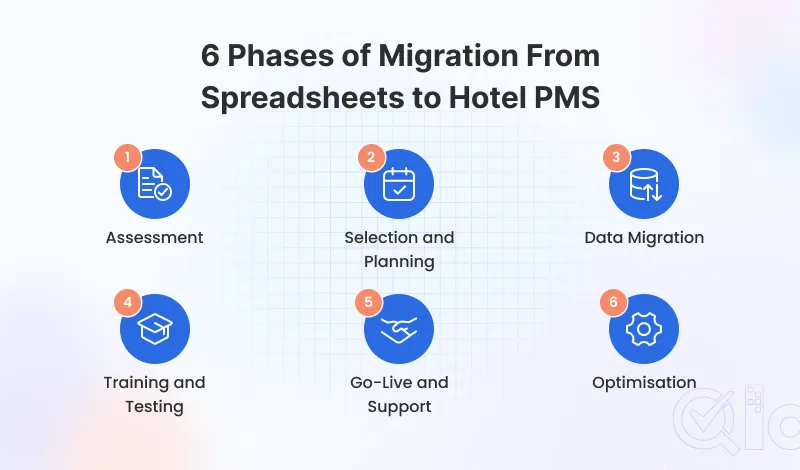
The process is divided into 6 simple phases, explained in detail below.
Phase 1: Assessment
Audit Your Current System
List every tool, spreadsheet, and manual process your team uses to run daily operations. You need to know where your data lives and where things are breaking down.
Pay close attention to bookings, room inventory, guest data collection, and financial reporting. These are the core things your new PMS must handle from day one.
Define Your Needs
Your audit will tell you exactly what to look for in a PMS. Write it down before you start talking to vendors so nothing important gets missed.
Think about channel manager integration, booking engine support, housekeeping and dynamic pricing. A clear list stops you from wasting time on features you will never touch.
Calculate Your ROI
Measure the true cost of manual processes by calculating staff hours spent on data entry and error correction each week. Multiply that by your average labour cost.
A modern hotel PMS typically reduces administrative workload by 30 to 50 percent in the first quarter. Use this benchmark to build your return on investment case.
Phase 2: Selection and Planning
Evaluate Your PMS Options
Explore multiple PMS options and rank them based on your requirements. Evaluate them on their user experience, features, tech support, and the total cost.
Ask each PMS provider for a live demo. Trying the system yourself helps your team understand it better than just seeing a sales pitch.
Create a Migration Timeline
Pick a go-live date you can meet and plan your work backwards. Keep time for data, staff training, and a buffer for delays.
Split the plan into weekly goals and assign each task clearly. This keeps everyone on track and avoids missing steps.
Assign a Migration Lead
Involve your hospitality staff and choose one senior person to lead the whole project. They will coordinate between your team, the PMS provider, and other partners.
Pick someone organised who can make quick decisions. One clear owner helps avoid confusion and delays.
Phase 3: Data Migration
Audit and Clean Your Data
Go through every spreadsheet and file you plan to move over. Delete duplicates, fix name errors, and remove anything outdated.
Clean data is what makes a migration go smoothly. Moving messy data into a new system just moves your problems along with it.
Map Your Data Fields
Match each column in your sheet to the right place in your new PMS. Details like name, email, date, room, and payment should all fit clearly.
Ask your PMS provider for a data mapping template. Many good providers will help you with providing CSV import documentation.
Validate Before You Go Live
Move a small batch of records across first before importing everything. Check that names, dates, and booking details all look right in the new system.
Fix any errors you spot before running the full import. Catching problems now saves you a lot of trouble after you have already gone live.
Phase 4: Training and Testing
Train Your Staff
Train each team member based on what they will actually use in the PMS. Pay close attention to the front desk system as it shapes the overall guest experience and satisfaction.
Run practical sessions using real situations like check-ins and billing. Staff who feel confident in the system are the ones who make it work.
Run Parallel Operations
Integrate your new hotel PMS alongside your spreadsheets for at least one week before go-live. Enter all live reservations into both systems and cross-check results daily.
This parallel phase provides a critical safety net during the transition. Your spreadsheet records remain available as a backup until full confidence in the new system is established.
Test Every Key Function
Test every core function your team will use before anyone checks in. Cover check-in, check-out, room status, payments, and management reports.
Have one person log every issue found during testing. Make sure everything critical is fixed with your vendor before your go-live date.
Phase 5: Go-Live and Support
Launch Day Preparation
Plan your go-live when bookings are low, like mid-week and not in peak season. This gives your team time to handle any issues.
Tell all staff what they need to do on launch day and ensure vendor support is ready. Clear communication helps everything run smoothly.
First-Week Troubleshooting
The first week will have bumps, and that is completely normal. Write down every issue with clear details so nothing gets lost or repeated.
Maintain active communication with your vendor’s tech support team throughout the first week. Fast reporting and quick resolution build operational confidence across your whole team.
Celebrate the Win
Formally acknowledge the effort your team put into the migration process. Recognising each department’s contribution builds long-term adoption and a positive attitude toward change.
The decision to migrate from spreadsheets to hotel PMS is a major step forward. Taking a moment to mark that achievement sets a strong tone for the optimisation phase ahead.
Phase 6: Optimisation
Stabilise Your Operations
Dedicate the first two weeks after go-live to reinforcing consistent system usage across all departments. Address any instances where staff revert to manual habits quickly.
Hold short weekly meetings to find issues and track progress. Fixing things early helps your system run smoothly and gives better results over time.
Leverage Advanced Features
Once your team is settled, it is time to get more out of your PMS. Automated messaging, dynamic pricing, and revenue analytics are where the real gains are.
Do not throw everything at your staff at once. Introduce one or two new features a week and give people time to actually get comfortable with them.
Measure Your ROI
At the end of month one, pull a full report of your hotel KPIs and compare it to where you were before the migration. Look at occupancy rate, ADR, RevPAR, and booking sources.
This is when you start seeing the real value of the switch. Share the results with your team and use them to keep improving.
Conclusion
Moving from spreadsheets to a hotel PMS is a smart step for any independent hotel. If done in the right order, the switch is smoother than most expect.
Each of these phases builds on the last. The process takes about 4 to 6 weeks, but the benefits last much longer.
Follow this guide to move from spreadsheets to a PMS with ease. Your property deserves a system that supports your daily work.
Get In Touch
If you are exploring a property management system with a great user experience. Then QloApps is the best solution for you.
QloApps offers various features to enhance your hotel business. Such as Virtual tours, Tours and Packages, Channel Manager, Front Desk, Cloud PMS, 100+ Add-ons, and many more.
To get started with this user-friendly software. Just download it and add your property to QloApps.
If you have any suggestions, you can share them on the QloApps forum. For any technical assistance, kindly raise a ticket.

Be the first to comment.