
Online bookings bring in the majority of hotel revenue, yet most hotels only convert a smaller portion of their visitors.
That means you’re leaving money on the table every single day. Guests abandon bookings due to slow sites, confusing steps, and poor photos.
This article shows you 10 proven ways to boost conversions and fix these issues, helping you win more direct bookings this month.
We’ll share real examples and actionable strategies you can implement immediately.
1. Optimise Page Load Speed
Guests leave your hotel website in just 3 seconds if it loads slowly. You lose half your potential bookings before they even see your rooms.
Compress your photos, turn on caching in your PMS (Property Management System) or Website, and use a CDN (Content Delivery Network) to speed things up.
Your analytics can show you which pages load the slowest, so you can fix them first.
A faster hotel website means more bookings and happier guests. Test your speed right now and watch your conversion rates climb.
2. High-Quality, Immersive Visuals
Guests book hotels based on what they see, not what they imagine. Websites with 360-degree virtual room tours convert way more bookings than those with static photos.
Use professional photos, add virtual tours, and let guests zoom into every corner of your rooms.
Show off your best rooms with clear, bright images and video walkthroughs.
Guests who see your space book faster and feel confident about their choice.
3. Simplify the Booking Flow
Extra checkout steps drive guests away. Your hotel website should get guests from “hello” to “booked” in minutes, not hours.
Use one-click bookings, add progress bars to show how close they are, and optimise for mobile devices.
Remove questions that aren’t essential and highlight what matters: price, dates, and confirmation.Keep your channel manager and PMS working behind the scenes invisibly.
4. Dynamic Pricing and Urgency Tactics
Flash sales and low-stock alerts can lift bookings significantly. When guests see “only 2 rooms left,” they stop comparing and hit book.
Use real-time pricing rules to adjust rates automatically based on demand. Add countdown timers that show guests your best rates are ending soon.
Your dynamic pricing feature syncs with your PMS to update prices instantly across all channels.
This keeps your rates competitive while maximising what guests pay.
5. Personalised Recommendations
Personalisation works because it feels like you know your guests.
When you suggest upgrades and add-ons that match what guests want, revenue jumps by 15-20%.
Use your booking data to say things like “Guests who booked your room type also loved our spa package.” Smart recommendations do this automatically based on past bookings.
Show upsells at the right moment in the checkout process. Guests appreciate suggestions that actually fit their trip, not random add-ons.
6. Mobile-Responsive Design
Six out of ten hotel bookings happen on phones, so your mobile experience must be perfect. Slow mobile checkout kills bookings faster than anything else.
Make buttons easy to tap, keep text readable, and reduce form fields on mobile.
Modern solutions like QloApps work beautifully on all devices out of the box.
Your guests use phones to research, compare, and book on the go. Build your hotel website for mobile first, then scale up to desktops.
7. Social Proof and Reviews
Verified reviews build trust, and trust builds bookings.
Hotels that show ratings and reviews convert better than those that hide them.
Pull reviews from Online Travel Agencies or use your native review system. Let guests see what others say about your rooms and service.
Moderation tools keep fake reviews out and highlight your best feedback. When guests see real praise, they book with confidence instead of doubt.
8. Flexible Cancellation Policies
Guests hesitate when they see strict cancellation rules, and hesitation kills bookings. Clear cancellation policies actually reduce abandonment.
Offer free cancellation up to 48 hours before arrival and make sure guests can see it at a glance.
Set different rules for each room type easily in your booking system.
Highlight your flexible policy in your booking flow so guests see it early. This simple change removes a major worry that stops bookings.
9. Retargeting and Abandoned Cart Emails
One out of ten guests who abandon their cart will book if you send them a reminder email. Automated emails with a discount win back a significant number of lost bookings.
Connect your booking system with email marketing tools to send automatic reminders. Offer a discount or free upgrade to bring guests back to complete their booking.
These emails work because they remind guests about their room choice at the right moment. Your PMS tracks who left, and your email tool delivers the reminder.
10. A/B Testing and Analytics
Testing small changes on your hotel website can boost conversions by 49%. You find out what works by testing headlines, buttons, and images with real guests.
Use Google Analytics together with your booking system’s analytics dashboard to track performance.
Run tests on your most-visited pages and implement winners quickly.
Continuous improvement means you never stop finding ways to convert more guests. Small wins add up to huge revenue growth over time.
Conclusion
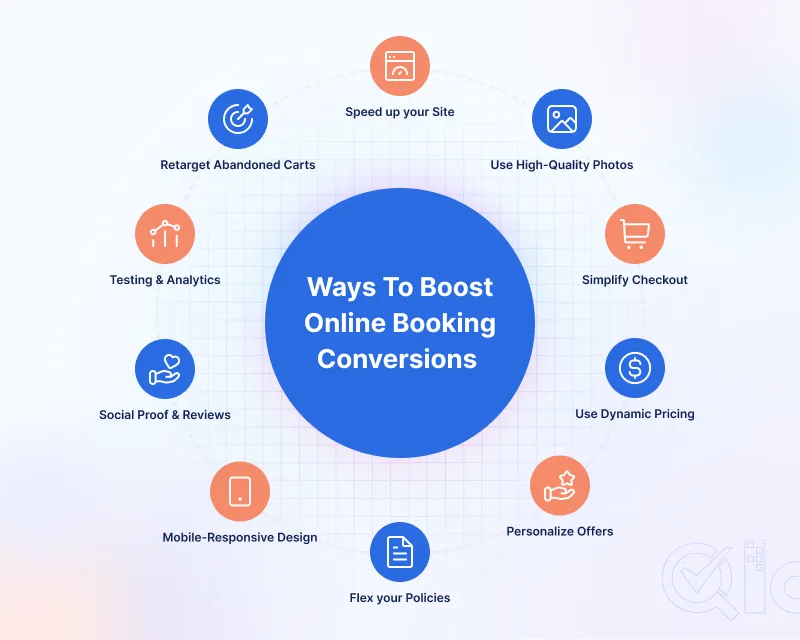
Speed up your site, add great photos, simplify checkout, and use dynamic pricing while personalizing offers and going mobile-first.
Show reviews, flex your policies, email abandoners, and constantly test everything to keep your site fast and engaging.
Start implementing these tips today by picking just one, and your booking engine will get smarter and more profitable with each change.
Let us know in the comments which tip you’ll implement first and share your results with other hoteliers.
Get In Touch
If you are a hotel owner and are looking for hotel booking software. Then QloApps is the best solution for you.
QloApps offers various features to enhance your hotel business. Such as Virtual Tours, Tours and Packages, Channel Manager, Front Desk, Cloud PMS, 100+ Add-ons, and many more.
To get started with this user-friendly software. Just download it and add your property to QloApps.
If you have any suggestions, you can share them on the QloApps forum.
For any technical assistance, kindly raise a ticket.


Be the first to comment.