QloApps Channel Manger- Balance Compensation on Plan Upgrade
Managing subscription plans should be simple. However, many subscription-based platforms still charge customers full price when they switch plans before their current subscription expires.
This often leaves users feeling that they are paying twice for the same service. To solve this challenge, QloApps Channel Manager introduces Balance Compensation on Plan Upgrade.
This feature automatically calculates the unused value of an active subscription and adjusts it against the cost of the customer’s new plan.
Instead of losing the remaining value of their current subscription, customers receive a fair adjustment during the first payment of their new plan.
Whether a customer upgrades or downgrades to a plan that better suits their business needs, the system ensures that billing remains accurate, transparent, and customer-friendly.
In this article, we’ll explore how Balance Compensation works, its benefits, and how different payment gateways process the adjusted payment.
Why Balance Compensation Matters
Customers often change subscription plans as their business grows. They may upgrade their Channel Manager subscription to access more features or manage additional properties.
Without a balance adjustment system, customers are typically required to pay the full amount for the new subscription, regardless of how much time remains on their existing plan.
This means they lose the value of the unused portion of their current subscription.
For example, imagine a customer purchases a monthly plan but decides to upgrade after only two weeks. Although half of the subscription period is still unused.
Traditional billing systems charge the full price for the upgraded plan without considering the remaining balance.
This approach can create dissatisfaction and discourage customers from upgrading when they actually need additional features.
Balance Compensation eliminates this problem by ensuring that customers only pay the difference between the remaining value of their current subscription and the cost of the new plan.
The process is fully automated, providing a smooth and hassle-free experience.
What Is Balance Compensation?
Balance Compensation is a billing mechanism that calculates the unused value of an active subscription whenever a customer changes their plan before the subscription expires.
Instead of discarding the remaining subscription value, the system converts it into a credit that is automatically applied to the customer’s new subscription.
As a result, customers are charged only the adjusted amount during their first payment, making the billing process fair and transparent.
It’s important to note that compensation is only available for active subscriptions. If the current subscription has already expired or no unused balance remains.
The customer is charged the full amount for the selected plan.
How Plan Upgrades Work
When a customer upgrades to a higher-priced subscription, the system performs a few simple calculations before processing the payment.
First, it checks whether the customer’s current subscription is still active.
If the subscription is active, the system calculates the unused balance based on the number of remaining days in the billing cycle.
This remaining value is then deducted from the price of the new subscription.
For example, consider the following scenario, the client wants to add two properties:
- Current Plan: $30/month (1 property)
- Remaining Subscription: 10 days
- Unused Subscription Value: $10
- New Plan Price: $60/month (2 properties)
- Amount Payable (First Month): $50
Instead of paying the full $60, the customer only pays $50 during the first billing cycle because the remaining $10 from the existing subscription is automatically adjusted.
From the next renewal onward, the customer pays the regular subscription price of the upgraded plan.
This ensures that customers never lose the value of the time they have already paid for.
How Plan Downgrades Work
Balance Compensation also supports customers who decide to move to a lower-priced subscription plan.
The system evaluates the unused balance from the current subscription and compares it with the price of the selected plan.
Depending on the remaining balance, two different scenarios are possible.
Scenario 1: The Remaining Balance Covers the New Plan
If the unused subscription balance is greater than or equal to the cost of the new plan, the customer does not need to pay anything for the first billing cycle.
Note: Some payment gateways such as Cashfree and PayPal do not support zero-value transactions. A minimum payment of ₹1 or $1 respectively is processed to complete the transaction successfully.
After the first billing cycle, all future renewals continue at the normal subscription price.
Scenario 2: The Remaining Balance Covers Only Part of the Cost
If the unused balance is lower than the cost of the selected plan, the remaining balance is deducted from the subscription price.
The customer simply pays the difference during the first billing cycle.
Once the adjustment has been applied, every subsequent renewal is charged at the standard subscription amount without any further calculations.
Benefits of Balance Compensation
Implementing Balance Compensation provides significant advantages for both businesses and customers.
For customers, it creates a fair billing experience by ensuring they never lose the value of their unused subscription period.
This builds confidence in the platform and encourages users to upgrade whenever they need additional functionality.
For businesses, the feature reduces billing disputes and support requests related to subscription changes.
Since the adjustment is performed automatically, manual calculations are eliminated, reducing the chances of billing errors.
Some of the key benefits include:
- Fair and transparent subscription billing
- Automatic calculation of unused subscription value
- Seamless plan upgrades and downgrades
- Consistent handling across Cashfree, PayPal, and Stripe
- Reduced customer complaints related to billing
- Increased customer trust and satisfaction
- Fully automated adjustment process with no manual intervention
How the Entire Process Works
Whenever a customer changes their subscription plan, QloApps Channel Manager follows a structured workflow.
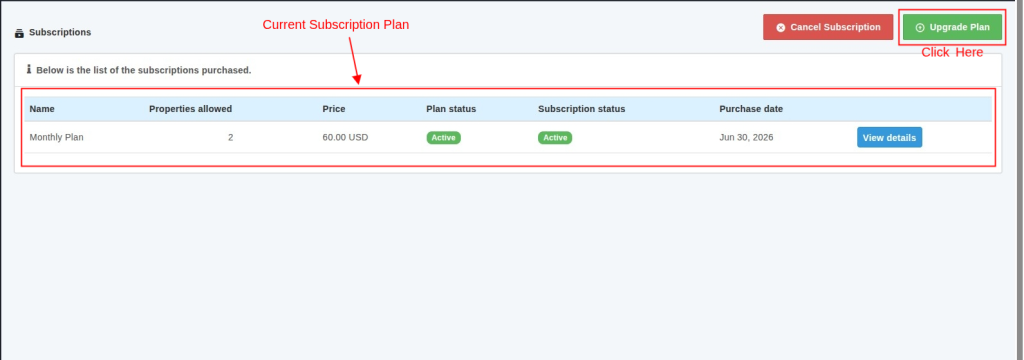
Step 1: Open Your Active Subscription
Go to the Subscriptions section in your QloApps Channel Manager account. Locate your active subscription and click Upgrade Plan.

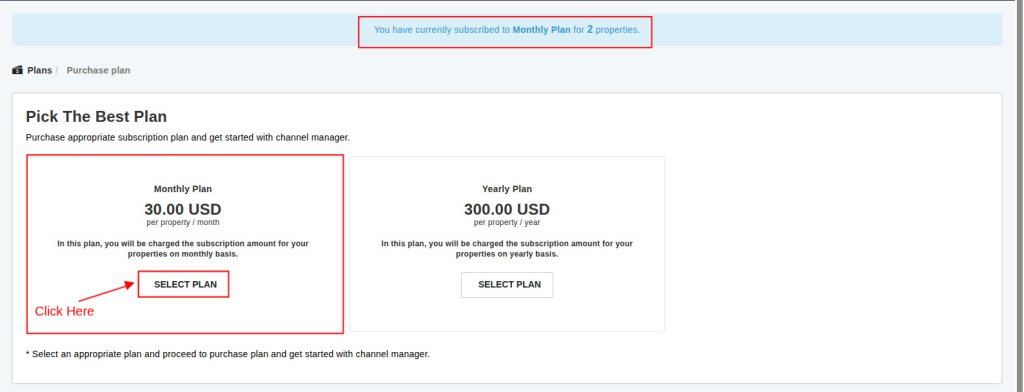
Step 2: Select the New Subscription Plan
Choose the plan that best suits your business needs. You can switch between monthly and yearly plans based on your requirements.

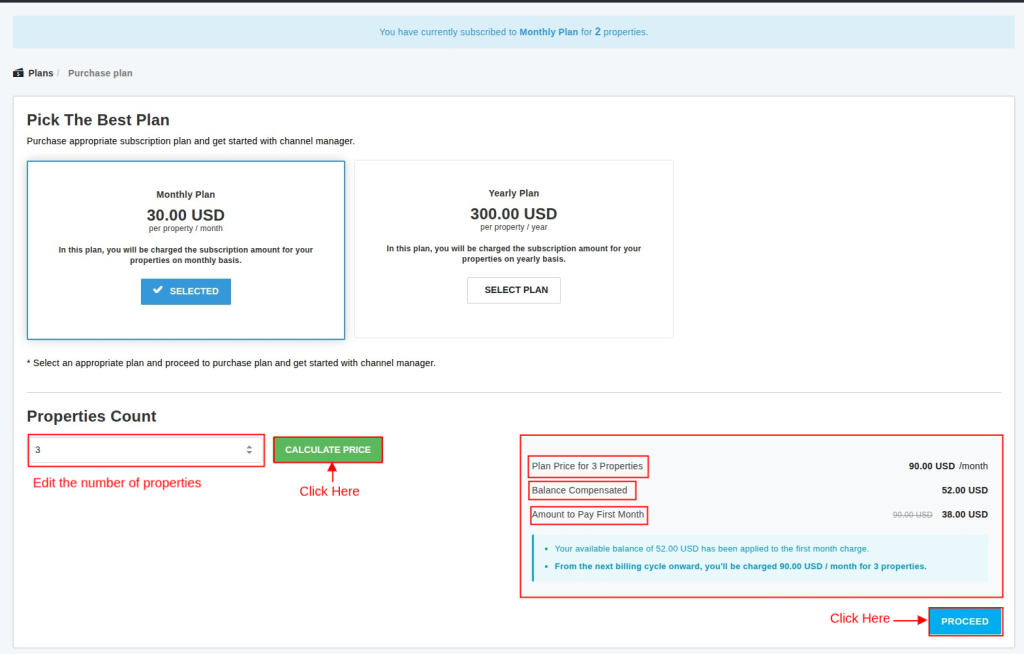
Step 3: Update the Property Count and Calculate the Price
Enter the required number of properties and click Calculate Price. QloApps automatically calculates the new subscription cost, and displays the adjusted amount payable for the first billing cycle.

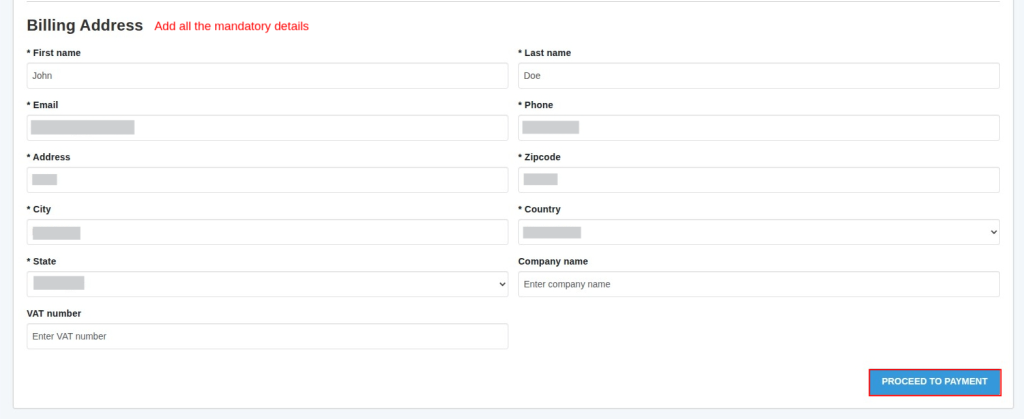
Step 4: Add the Billing Details
Fill in the required billing details and click Proceed to Payment

Step 5: Complete the Payment
Verify the plan price, the balance compensation applied, the amount payable for the first month, and the standard amount that will be charged in future billing cycles.
You can then complete the payment using your preferred payment gateway, such as PayPal or Stripe.

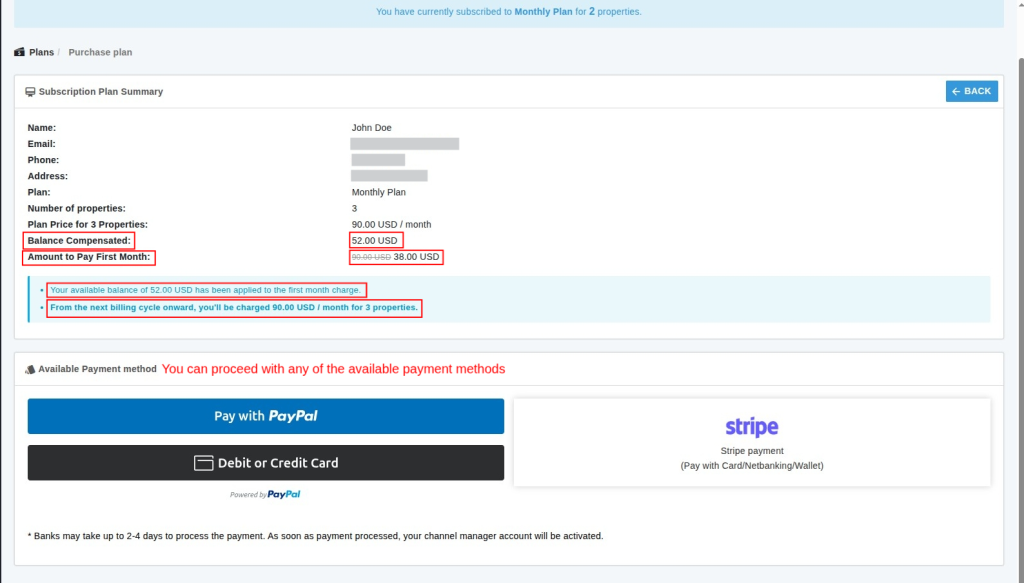
This automated workflow ensures accurate billing while maintaining a smooth experience for every customer.
Conclusion
Subscription flexibility has become an important expectation for modern businesses. Customers want the freedom to upgrade or downgrade their plans whenever their requirements change.
They also expect to retain the value of their existing subscription instead of losing the unused balance.
The Balance Compensation feature in QloApps Channel Manager automatically applies the unused subscription balance to the customer’s new plan.
Whether the customer upgrades to access more features or downgrades to optimize costs, the billing process remains fair, accurate, and completely transparent.
QloApps Channel Manager supports Cashfree, PayPal, and Stripe with automated balance calculations and gateway-specific payment handling.
As a result, businesses can offer a seamless and transparent subscription management experience while ensuring a better experience for their customers.
In case of any query, issue, or requirement please feel free to raise it on QloApps Forum.