
Growing a hotel business often means managing more properties. As you add new hotels, billing each one separately can become difficult and time-consuming.
The QloApps Channel Manager Partner Program solves this by turning any hotelier into a partner who can refer other hotel accounts as clients.
Those clients get full Channel Manager access with no plan purchase of their own, and the partner is billed automatically for all of them in one invoice each month.
In this article, we’ll explore how the QloApps Channel Manager Partner Program works, how billing is calculated, and how to get started.
WHY THE PARTNER PROGRAM MATTERS
Managing multiple hotel accounts separately can create extra work. You need to track different plans, renewal dates, and payments for each client.
The Partner Program makes this process much simpler. It brings all your referred clients under one account.
As a result, you get:
- One partner account.
- One authorized payment method.
- One monthly invoice.
- No need to manage separate payments for each client.
Moreover, this setup saves time and makes it easier to manage more hotels as your business grows.
WHAT IS THE PARTNER PROGRAM?
The Partner Program lets a hotelier (the partner) refer other Channel Manager users (their clients) via a referral link.
Once approved, clients get full access to the Channel Manager. They do not need to buy a separate plan. Instead, the partner pays for all their properties through one account
Note: partner access is not self-serve. An account has to be flagged as a partner by QloApps support before the Partner option appears in the account menu.
HOW BILLING WORKS
The Partner Program follows a simple pricing model. QloApps charges $30 per property per month, just like its standard monthly plan.
To understand this better, let’s look at an example.
Suppose you refer three clients:
- Client 1 manages 6 properties.
- Client 2 manages 4 properties.
- Client 3 manages 2 properties.
Together, these clients manage 12 properties.
At $30 per property, your monthly bill will be:
12 properties × $30 = $360 per month.
QloApps generates the invoice automatically on the 1st of each month. The system also charges your authorized payment method. So, you don’t need to make manual payments.
What happens if a property is deleted during the month?
Even if you delete a property before the billing cycle ends, it will still appear on that month’s invoice if it was active during part of the cycle.
BENEFITS
- Refer clients with a shareable link
- Give every referred client full access with no plan purchase on their side
- Receive one combined invoice a month instead of billing each client separately
- Authorize a payment method once and have every future invoice charged automatically
- Choose Stripe or Cashfree, whichever fits the partner’s country
- Suspend or reactivate a client without losing the referral relationship
- Download a line-item invoice for any billing cycle, broken down by client
HOW THE ENTIRE PROCESS WORKS
Step 1: Authorize a Payment Method
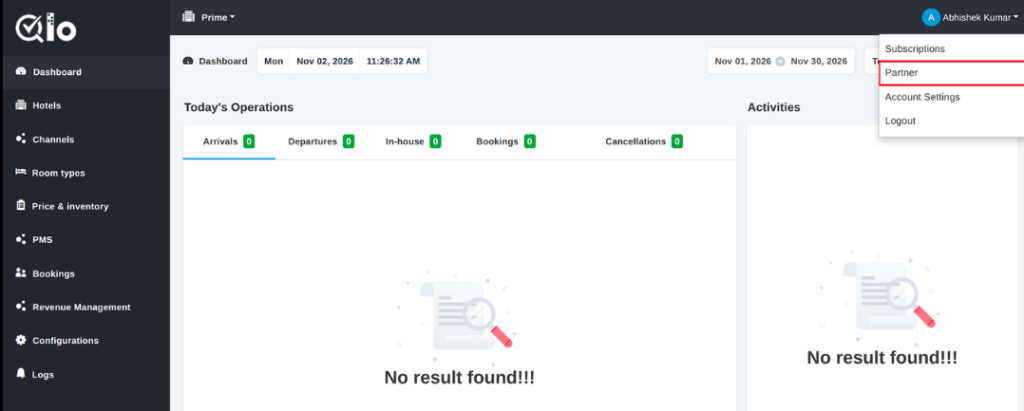
Open the account menu in the top-right corner and select Partner.
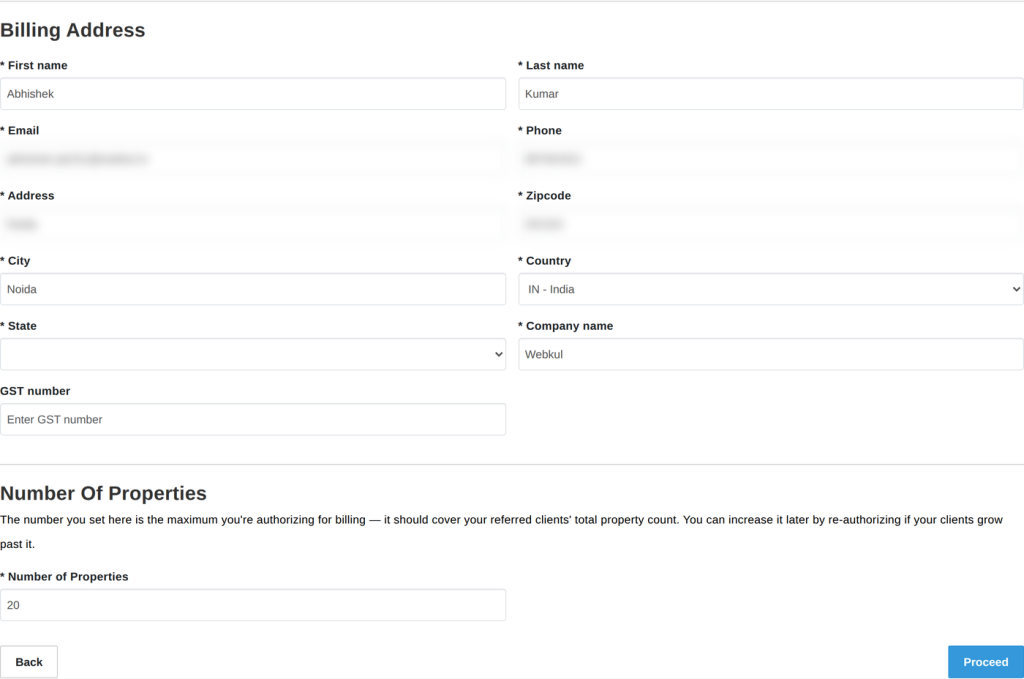
Fill in the billing address and authorize a payment method — Cashfree for an Indian billing address, Stripe for everywhere else. No client can be referred or managed until this step is complete.
Step 2: Refer a Client
Share the referral link from the Partner page, or send an invite by email, and anyone who signs up through it is linked automatically.
Step 3: Approve the Client
A referred client starts out Pending. Approving them from the Partner page switches on their full access immediately.

Step 4: Manage Clients as They Grow
Every client’s property count and status are visible on the same page. Suspend a client to block their access without losing the referral link, reactivate them later, or remove them entirely.
For a Cashfree-authorized partner, clients’ combined properties are capped at whatever number
was authorized in Step 1 — reauthorizing for a higher number raises that cap at any time.

Step 5: Get Billed Automatically
Once a month, the invoice is generated and charged against the authorized payment method with no
action needed.
A declined charge is retried and emailed to the partner immediately; an invoice left unpaid suspends the partner’s account after 3 days and their clients after 7.

CONCLUSION
The QloApps Channel Manager Partner Program makes it easier to manage multiple hotel accounts.
Instead of handling separate plans and payments, you can manage all your referred clients through one partner account.
You only need to authorize a payment method once. After that, QloApps handles monthly billing automatically through a single invoice.
With support for both Stripe and Cashfree, the program also offers flexible payment options based on your billing country.
Whether you manage a few hotels or plan to expand your business, the Partner Program helps simplify client management and billing.
For technical assistance, raise a ticket at QloApps Support. In case of any query, issue, or requirement, please feel free to raise it on the QloApps Forum.

Be the first to comment.