
Creative hotel room descriptions transform standard features into a luxurious preview of the vacation. Using the same terms makes unique properties blend right in.
Guests scan room details in a flash. They will quickly move on to another hotel if your copy fails to grab their attention.
This guide outlines a clear strategy to write distinct room copy for your hotel website. You will find practical and real-world examples for every room type.
Why Most Hotel Room Descriptions Fail to Convert
They List Features Instead of Selling Experiences
“King bed with en-suite bathroom” tells a guest what is there. This blunt text lacks appeal.
“Wake up to a harbor view from your king bed, steps from a rainfall shower” sells a feeling. That is what makes someone click Book Now.
They Use the Same Language as Every Competitor
Words like “cozy,” “modern,” and “spacious” appear on every hotel page. Guests skip past them without stopping.
Your room description needs one detail that no other hotel can copy. That detail gives guests a reason to choose you.
They Ignore How Guests Actually Search
Guests search for specific things like “hotel room with bathtub” or “twin room near airport.” Generic text does not match those searches.
A room page that uses the words guests type into Google gets found. Your hotel website SEO decides whether yours is the one they find or skip.
The Anatomy of a Hotel Room Description That Converts
Your Opening Line Drives the Entire Sale
The first sentence must answer a basic need. This initial statement establishes the message.
Generic: “Our Deluxe Room offers a comfortable stay with modern amenities.”
Better: “The Deluxe Room faces east. You get the sunrise over the harbor before the rest of the city wakes up.”
Follow With Specifics, Not Adjectives
Every adjective requires proof. “Large bathroom” should become “bathroom with a freestanding tub and a separate walk-in shower.”
“Great view” should become “unobstructed view of the old city from the fourth floor.” Specific words stick. Vague words do not.
End With a Decision Trigger
Close each description with something that reinforces value. “Only four rooms of this type available” or “our most requested room for anniversary stays” both work well.
Guests need a small push. End your text with a clear incentive that inspires hesitant guests to book direct instead of using third-party sites.
Room-by-Room Description Guide
Standard and Deluxe Rooms
Show why this option outperforms basic rooms. Name the bed size, floor number, scenic view, and best amenity.
Keep it concise. Guests scan these pages and move on fast.
Superior and Junior Suite Rooms
These guests spend more money. Justify the price in your first sentence.
Lead with space, then view, then in-room extras. Mention who this room suits, such as couples or business travelers on longer stays.
Family Rooms
Parents want to know the sleeping arrangements first. State them clearly at the top.
Mention safety features, room size, and how close the room is to hotel facilities for children. Parents book with that information in mind.
Accessible Rooms
Clarify accessibility with your roll-in shower, grab bars, door width, and how far the room sits from the elevator
Vague “accessible” claims frustrate guests who need certainty before they book. Give them the details, and they will trust you.
The Words That Sell and the Words to Cut
Words That Actually Convert
Use specific measurements like “42 square meters” or “180cm king bed.” Use sensory details like “blackout curtains,” “rainfall shower,” and “Egyptian cotton linen.”
Add location details like “corner room with two exposures” or “third floor overlooking the pool.” These details stick in a guest’s mind.
Online reviews & guest testimonials build trust. “Most booked room type” and “popular with honeymoon guests” both reassure someone who is still deciding.
Keep a short list of these words on your desk. Reach for them every time you write hotel room descriptions for a new room type.
Words to Remove Immediately
“Comfortable,” “modern,” “cozy,” “spacious,” and “well-appointed” appear on thousands of hotel sites. Guests read past them without noticing.
Cut them from every page. Replace each one with a fact that proves the same point.
How to Optimize Room Descriptions for Google and AI Search
Learn how to get your hotel on ChatGPT and Google AI Search before your competitors do.
Each Room Type Needs Its Own Page
One main listing page hurts your search rank. Every specific room style requires a separate link, web title, and text.
Google ranks specific pages instead of hidden text blocks. Create a unique web page for every single room option.
Use Specific Keywords Guests Actually Search
Track actual user search terms. Phrases like “hotel room with bathtub city center” or “twin room near airport” show up in real searches every day.
Place these key phrases within your opening paragraph. Blend them into the sentences smoothly without forcing the text.
Add FAQ Schema to Every Room Page
Common questions guests ask include: “Does this room have a balcony?” or “What floor is this room on?” Answer these on the page itself.
The FAQ Section helps Google pull your room details into AI Overviews and featured snippets. That puts your hotel in front of guests before they even click.
Write for AI Search Too
ChatGPT and Google AI Search pull room details directly from websites. Specific, well-structured hotel room descriptions get recommended. Vague ones get skipped.
Write for the guest first. Clear sentences and real details are exactly what AI search tools look for.
Before and After: Practical Examples
Standard Room
Before:
Our Standard Room offers a comfortable stay with all modern amenities, including a flat-screen TV, air conditioning, and an en-suite bathroom.
After:
The Standard Room sits on the third floor with a garden view. The king bed has blackout curtains for late sleepers. The bathroom has a walk-in shower and complimentary toiletries from a local brand.
Suite
Before:
Our Executive Suite is perfect for guests looking for a luxurious experience with extra space and premium amenities.
After:
The Executive Suite spans 65 sqm with a separate living room and bedroom. Floor-to-ceiling windows face the harbor. Guests enjoy a dedicated check-in line and a complimentary minibar on arrival.
Hotel Room Description Checklist: Before You Hit Publish
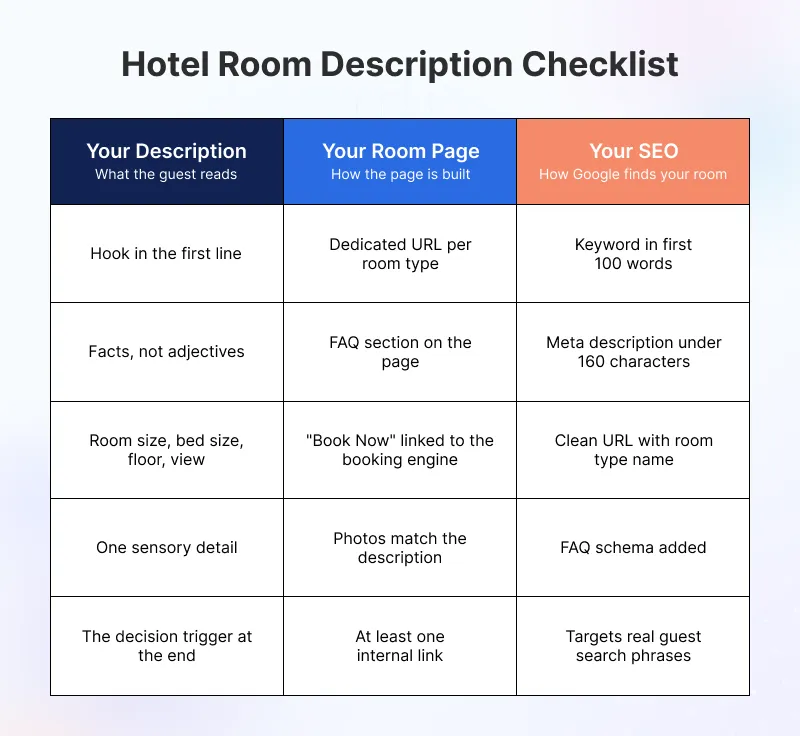
Writing a room description takes time. But publishing the wrong one costs you bookings.
Run through this checklist before every room page goes live.
Description Checklist
- The first sentence creates a picture or answers a guest’s specific need
- Every adjective has a real fact behind it, no “spacious” or “comfortable”
- Room size, bed size, floor level, and view are all clearly stated
- At least one sensory detail is included, such as shower type, linen, or curtains
- A decision trigger line sits at the end to give guests a reason to book now
Room Page Checklist
- Each room type has its own dedicated URL and title tag
- The FAQ section answers at least two common guest questions
- A “Book Now” button links directly to this room in your booking engine
- Room photos match exactly what the description promises
- Page is internally linked to at least one related page on your website
SEO Checklist
- Target keyword appears in the first 100 words of the page
- Meta description is written and stays under 160 characters
- Page URL is clean and includes the room type name
- The FAQ schema is added to help Google pull room details into search results
- Page is optimized for the specific phrases guests actually search
How Your Hotel Management System Helps
Manage Every Room Type Page From One Place
A Centralized property management software (PMS) streamlines your daily updates. Adjust a single description to sync your website and booking platforms instantly.
Consistent hotel room descriptions across channels build guest trust. They also send stronger signals to AI recommendation tools.
Connect Room Descriptions to Your Booking Engine
Every room description should have a direct “Book Now” CTA button linked to your booking engine. The shorter the path from description to booking, the more guests you convert.
A hotel management system connects your room content directly to your booking engine. That means a guest who reads your description can book in seconds, without leaving your website.
Improve Your Hotel Website SEO From One Dashboard
A PMS lets you edit page titles, meta descriptions, and room page URLs without touching any code. Your Hotel SEO optimization updates go live fast, without waiting on a developer.
Better page structure and clean URLs help Google index each room type correctly. More indexed pages mean more chances for guests to find your hotel through search.
Conclusion
Hotel room descriptions are your front-line sales tool, not just content on a page. Most independent hotels leave bookings on the table because room pages read like spec sheets.
Specific sensory language, dedicated room pages, and clear answers to guest questions close that gap. Small changes to your words can bring a real change in your bookings.
A PMS that connects your room content to your booking engine makes the whole process easier. From updating descriptions to converting visitors into guests, it handles everything from one place.
Get In Touch
If you’re ready to elevate your hostel’s operations and want to build a strong online presence, QloApps is here to assist!
Let’s collaborate to streamline your processes and enhance guest satisfaction.
To get started with this user-friendly software. Just download it and add your property to QloApps.
If you have any suggestions, you can share them on the QloApps forum. For any technical assistance, kindly raise a ticket.

Be the first to comment.