
Many small hotels still use fixed room rates instead of dynamic pricing. Some charge the same price throughout the year, while others use only high-season and low-season rates.
But hotel demand does not stay the same.
A room may be worth more on a busy Saturday than on a quiet Tuesday. Demand may rise during holidays, local events, or sudden booking surges. This is where dynamic pricing helps.
Dynamic pricing means adjusting room rates based on changing demand and booking conditions. Small hotels do not need to adopt an advanced strategy immediately.
They can start with simple pricing rules and gradually add more layers. Think of it as a five-level dynamic pricing system. Each level builds on the previous one.
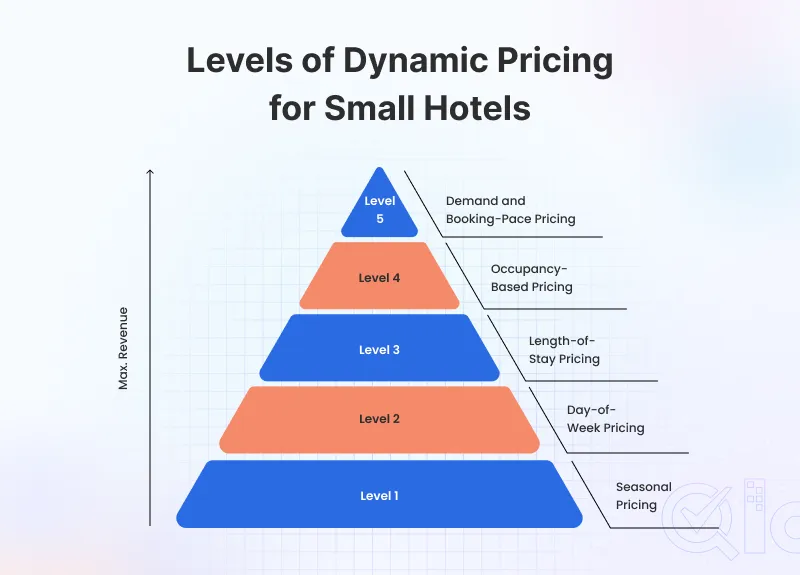
Level 1: Seasonal Pricing
Seasonal pricing is the foundation of dynamic pricing. Hotel demand changes throughout the year due to weather, holidays, festivals, business cycles, and travel patterns.
Charging the same rate every month can lead to missed revenue during busy periods and fewer bookings during slower months.
For example, imagine a small beach hotel where demand changes throughout the year.
During the rainy season, fewer tourists visit, so the hotel may lower its room rate. During holiday periods, when more travellers arrive, it can charge more.
A standard room might be priced at:
- Low season: $75 per night when demand is weak
- Shoulder season: $90 per night when demand starts improving
- High season: $115 per night when bookings are strong
- Peak season: $140 per night during holidays or the busiest travel weeks
The room and service remain the same. Only the demand changes, so the hotel adjusts the price accordingly.
To define seasons, hotels should review past booking data, occupancy trends, events, and guest travel patterns.
A city hotel may have completely different peak periods from a beach resort.
Tip: Use your own booking history instead of copying another hotel’s seasonal calendar.
Level 2: Day-of-Week Pricing
Once seasonal pricing is in place, the next step is adjusting rates by day of the week.
Demand often changes between weekdays and weekends. Business hotels may perform better from Monday to Thursday, while leisure properties may see stronger demand on Fridays and Saturdays.
For example, a small leisure hotel may see lower demand on weekdays and higher demand on weekends. Its rates might be:
- Monday to Thursday: $100 per night when demand is lower
- Friday: $110 per night as weekend demand begins to rise
- Saturday: $120 per night when demand is highest
- Sunday: $105 per night as weekend demand starts to fall
Now the hotel considers both the season and day of the week.
Review the last 6 to 12 months of booking data. If weekends regularly achieve higher occupancy than weekdays, higher weekend rates may be justified.
Similarly, weaker days may need more competitive pricing.
Level 3: Length-of-Stay Pricing
Length-of-stay (LOS) pricing adjusts offers based on how many nights a guest books.
For example:
- 1 night: Standard rate
- 2 nights: 3% discount
- 3 nights: 5% discount
- 5 nights: 8% discount
Consider two bookings:
Guest A:
1 night × $120 = $120
Guest B:
3 nights × $114 = $342
Guest B pays a lower nightly rate but generates much higher total booking revenue. Longer stays can also reduce room turnover and repeated check-in and check-out work.
LOS dynamic pricing is especially useful for resorts, boutique hotels, wellness retreats, and destinations where guests naturally stay several nights.
However, discounts should be used carefully. A longer stay should not automatically receive a large discount during peak-demand dates.
Level 4: Occupancy-Based Pricing
At Level 4, pricing starts reacting to actual room availability. The principle is simple: as more rooms are booked, the remaining inventory becomes more valuable.
A small hotel could create rules such as:
- 0–40% occupancy: Base rate
- 41–60% occupancy: Increase by 5%
- 61–75% occupancy: Increase by 10%
- 76–90% occupancy: Increase by 15%
- Above 90% occupancy: Increase by 25%
Suppose a room starts at $120. As occupancy increases, the rate could move to $126, $132, $138, and eventually $150.
This approach is particularly useful for small hotels because a few bookings can quickly change overall availability. For a 20-room property, five new bookings represent 25% of total room inventory.
Occupancy-based pricing helps hotels avoid selling their last available rooms too cheaply.
Level 5: Demand and Booking-Pace Pricing
The fifth level looks beyond current occupancy and considers how quickly demand is developing.
Occupancy shows how many rooms are booked. Booking pace shows how fast those bookings are arriving.
Imagine two future dates with 60% occupancy:
- Date A: Two new bookings in the last week
- Date B: Ten new bookings in the last three days
Both dates have the same occupancy, but Date B shows much stronger demand. The hotel may increase rates earlier because the date is filling faster.
At this level, hotels can consider:
- Booking velocity
- Days before arrival
- Recent booking pickup
- Local events
- Public holidays
- Competitor availability
- Remaining room inventory
For example, if a major conference is announced nearby and bookings suddenly increase, a hotel may raise rates before reaching a high occupancy threshold.
This makes dynamic pricing more responsive to real market conditions.
How the Five Levels Work Together
A mature pricing strategy combines all five levels.
For example:
- Season: High-season base rate = $120
- Day: Saturday premium = +10%
- Stay length: 3-night booking receives a small adjustment
- Occupancy: High occupancy triggers a rate increase
- Demand: Fast booking pace signals another pricing opportunity
The final room rate reflects several real conditions rather than one fixed number.
Do Not Ignore Orphan Dates
An orphan date is a single empty night between booked or high-occupancy dates.
For example:
- Thursday: Booked
- Friday: Empty
- Saturday: Booked
Friday becomes the orphan date.
Hotels can reduce these gaps by adjusting the rate slightly, encouraging stay extensions, offering multi-night packages, or reviewing minimum-stay restrictions.
Individually, orphan dates may seem minor. Over time, however, repeated gaps can become a significant revenue leak.
How QloApps Can Support Smarter Pricing
As pricing becomes more dynamic, manual rate management can become difficult, especially when a hotel sells through multiple channels.
QloApps helps hotels centralize reservation, room inventory, availability, and property operations. Historical booking and occupancy patterns can help hoteliers make more informed pricing decisions.
With the QloApps Channel Manager, hotels can manage rates and inventory across connected sales channels from a centralized system.
This reduces repetitive manual updates and helps maintain better rate and availability consistency.
For small properties, moving through different levels of dynamic pricing, centralized control can make pricing strategies easier to manage.
Which Level Is Right for Your Hotel?
You do not need to reach Level 5 immediately.
If you use one fixed rate, start with seasonal pricing. If seasonal rates are already in place, add day-of-week adjustments.
Hotels with longer guest stays can explore LOS pricing, while properties with rapidly changing availability can introduce occupancy-based rules.
More advanced hotels can then use booking pace and changing demand to guide pricing decisions.
The goal is not simply to charge more. It is to set the right price based on demand, availability, booking behaviour, and timing.
For small hotels, the best approach is simple: identify your current pricing level, improve it, and add the next layer when you are ready.
Conclusion
Dynamic pricing for small hotels does not have to be complex. Start with simple seasonal rates, then gradually add day-of-week, length-of-stay, occupancy, and booking-pace pricing.
The goal is simple: adjust room rates based on real demand and availability to improve revenue without overcomplicating your pricing strategy.
Get in Touch
Ready to make hotel pricing and operations easier to manage? Explore how QloApps helps you centralize reservations, room inventory, availability, and channel management in one place.
Have questions or ideas? Join the QloApps forum and share your thoughts. Need setup help? Raise a support ticket, and our team will help you.

Be the first to comment.